
THE SHORT VERSION
Your biological prime time is the part of the day when you tend to have the most energy for demanding work. To find yours, record how you feel at different hours, look for a pattern across days, and try scheduling an important task in one of your stronger periods.
You may find more than one useful window. Your energy, focus, and motivation may also keep different hours.
I first learned about biological prime time from Chris Bailey's The Productivity Project. I recommend the book. It got me interested in a question that is easy to overlook when filling a calendar: which hours are actually good for the work I want to do?
I make Body Prime Time Finder, the app used in the walkthrough below. You can also do this experiment with a notebook or spreadsheet. The useful part is noticing what repeats and testing a change in your day.
01 / UNDERSTAND
What biological prime time means
Some hours feel better suited to writing, studying, solving a difficult problem, or making a decision. At other times, the same task feels slow. Biological prime time is a useful name for the stronger stretches you notice in your day.
In his account of the method, Bailey credits Sam Carpenter's Work the System with the term. Bailey recorded energy, focus, and motivation hourly for 21 days, then used the patterns to decide when to do his most demanding work.
There is biology here, but your chart has context
Circadian rhythms are physical, mental, and behavioral changes across a roughly 24-hour cycle. Light and darkness help shape them, alongside influences such as activity, food, and stress. They affect sleep patterns, hormone release, and other functions. NIGMS explains the underlying biology.
Chronotype describes differences in the timing of people's sleep and activity preferences. Morning and evening types can perform differently depending on the hour and the task. A 2018 study by Facer-Childs and colleagues examined cognitive and physical performance at different times of day. That research doesn't tell us how many more emails you will answer or how much faster you will write.
You may also come across ultradian rhythms, cycles shorter than a day. They don't give everyone a guaranteed 90-minute work timer. A ratings log shows how you feel in your actual circumstances. It doesn't measure your internal clock or establish why a particular hour went well.
02 / OBSERVE
Set up an experiment you can sustain
Start with the hours you could realistically use. If you're trying to improve a workday, cover the whole workday. If you want to compare morning and evening study sessions, include both. Sampling only the hours you already like makes the exercise less useful.
Rate three things, separately
Use a scale from 1 to 10 and give the numbers a reasonably consistent meaning. A 1 might mean very little capacity, a 5 an ordinary middle level, and a 10 unusually high. You are comparing yourself with yourself. Someone else's 8 is irrelevant.
Rate your current state. Then, if useful, add a short note about what you were doing. "Editing a proposal; interrupted by two calls" says more than "bad morning." Sleep, coffee, lunch, exercise, and a noisy room can also be worth noting. A note gives context; it doesn't prove cause and effect.
Choose a cadence, then keep showing up
Try one check-in each hour during your chosen period. Keep it brief enough that you will still do it on a busy day. If hourly logging is too much, pick a few repeatable times spread across the day. You will get a less detailed picture, but a schedule you follow is more useful than one you abandon.
Plan on about three weeks to start, borrowing the duration of Bailey's experiment. Review sooner to spot hours you keep missing. Three weeks isn't a finish line that guarantees accuracy. What matters is having repeated observations at the hours you want to compare.
MISSED A CHECK-IN?
Leave it missing and record the next one. Reconstructing yesterday's 3 p.m. rating from memory adds a guess to a log of observations.
Track the life you actually live
Bailey changed several conditions for his experiment, including avoiding caffeine and alcohol. For a first scheduling experiment, my suggestion is to keep your usual routine reasonably comparable and note disruptions. That helps you answer when work tends to feel easier under your current conditions.
Changing your sleep schedule, coffee intake, exercise, and work hours together makes it harder to interpret a difference. You don't need to reproduce a controlled experiment to make a useful calendar decision. Just be clear about what your log can tell you.
03 / MAKE SENSE OF IT
Read the pattern, not just the tallest bar
Group entries by hour and average each rating. If your focus ratings at 10 a.m. are 7, 8, and 9, their average is 8. Do the same for energy and motivation. A combined score gives each of the three metrics equal weight.
Keep the number of entries alongside each average. An hour with one good observation is a different proposition from an hour that has looked good across a dozen days.
A WORKED EXAMPLE
Which hour would you choose?
| Hour | Entries | Energy | Focus | Motivation | Combined |
|---|---|---|---|---|---|
| 09:00 | 12 | 8 | 5 | 8 | 7 |
| 10:00 | 12 | 7 | 9 | 8 | 8 |
| 11:00 | 11 | 7 | 8 | 6 | 7 |
| 14:00 | 12 | 4 | 6 | 5 | 5 |
| 18:00 | 2 | 9 | 9 | 9 | 9 |
The 6 p.m. score looks tempting, but it comes from just two entries. I would collect more evening observations before rearranging my day around it. In this example, 10 a.m. looks like a reasonable place to try a demanding task, with 11 a.m. offering another promising hour.
Notice something else: 9 a.m. and 11 a.m. have the same combined score, but focus is 5 at one and 8 at the other. If the task needs sustained attention, that difference is worth exploring. A combined chart can conceal exactly the distinction you care about.
Look for stretches of usable time, not a perfect starting minute. Small differences in averages aren't necessarily meaningful. Check the notes too. Perhaps your strongest ratings came from quiet writing sessions, while your weaker ones followed difficult meetings.
Missing hours aren't low-scoring hours. And a flat chart is a result, not a failure. It may mean time of day isn't the main distinction in the observations you've collected.
04 / THE APP WALKTHROUGH
Track it with Body Prime Time Finder
BPTF keeps your check-ins on your phone and groups them into hourly charts. You enter the ratings yourself. There are no sensors to connect or account to create.
1. Choose your hours and reminders
Open Settings and choose your tracking hours. For example, a range from 07:00 to 22:00 displays the hours from 07:00 through 21:00.
Enable Tracking reminder notifications if you want a prompt, and choose a minute past the hour. Start with :00 to keep things simple. Allow notifications when your phone asks.
2. Record how you feel
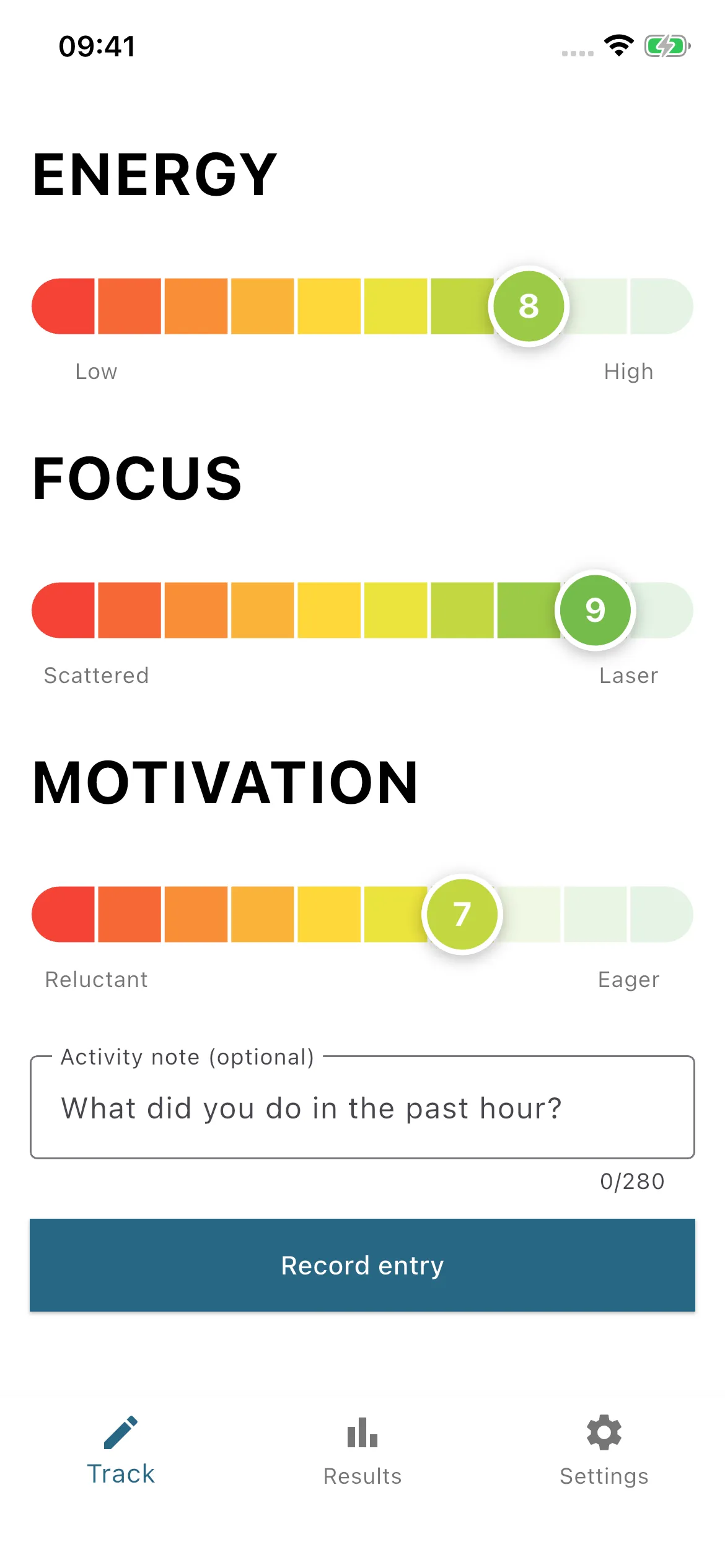
On Track, set Energy, Focus, and Motivation from 1 to 10. Add an optional activity note, then tap Record entry.
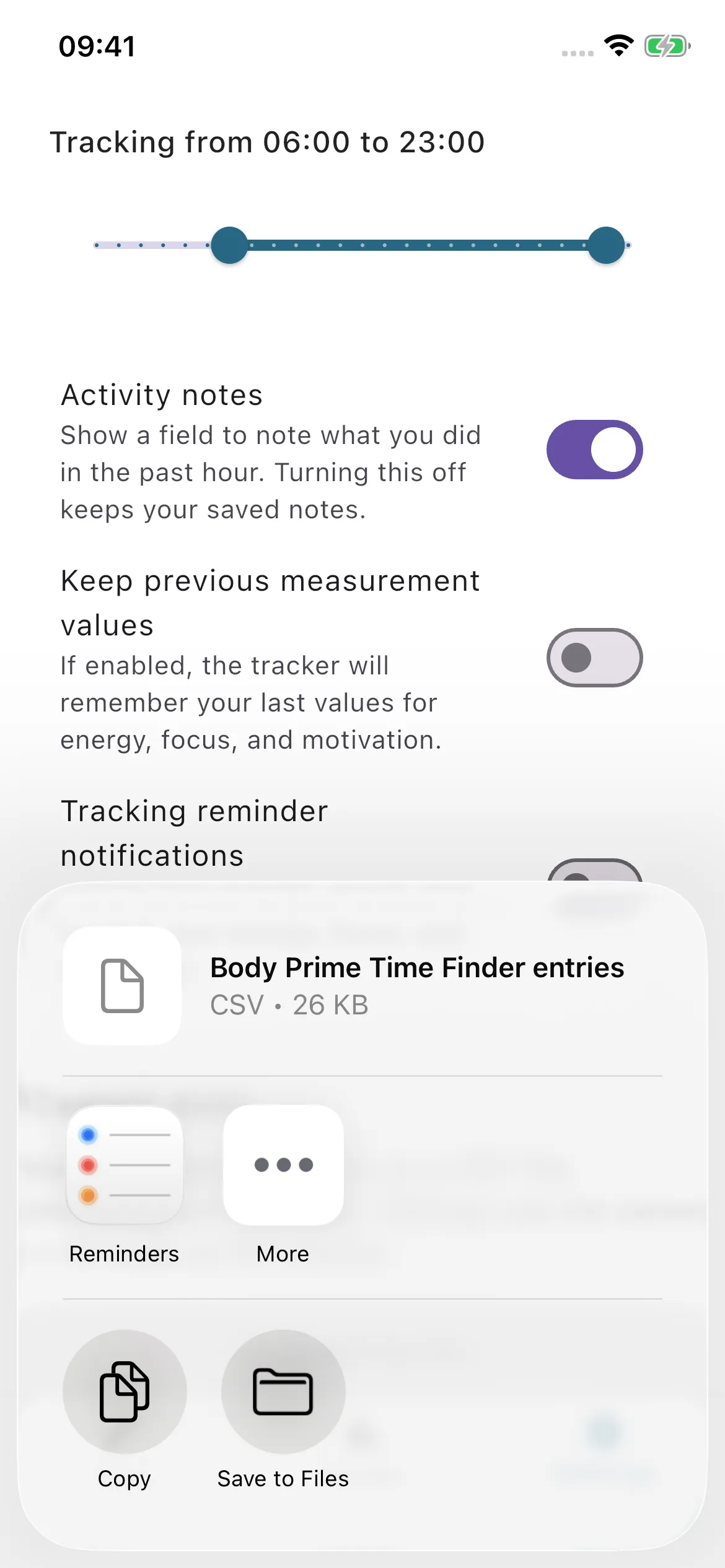
The note prompt asks what you did in the past hour. A short phrase is enough. You can hide the field under Settings → Activity notes; saved notes remain in your history.
If you enable Keep previous measurement values, reconsider each rating before saving. The previous entry is a starting point, not an answer to the next check-in.
A NOTE ABOUT LOGGED HOURS
Entries are saved to the nearest hour. A check-in at 10:15 belongs to 10:00; one at 10:45 belongs to 11:00. Use a consistent check-in time when comparing days.
3. Look at Results in both modes
Open Results → Combined for the overall pattern. Check the entries, days, and hours covered before deciding what a bar means. A gap means you haven't recorded an entry for that hour.
Switch to Separate to see energy, focus, and motivation individually. If they disagree, think about the work you want to do. Being eager to start a task and being able to concentrate on it are different things.
Open Entry history to read individual ratings alongside their notes. The charts summarize your check-ins; the history helps you remember the circumstances.
4. Export when you want a closer look
Use Settings → Export CSV to save or share all your entries, including activity notes. The ratings in the export use the same 1-to-10 scale as the tracker.
A spreadsheet is useful when you want to compare weekdays with weekends, isolate a recent date range, or look at similar activities. BPTF's Results screen pools entries by clock hour within your selected hours; it doesn't provide those extra filters.
Each saved entry contributes to the average. Logging repeatedly within one hour gives that day's hour more weight, so a consistent cadence makes comparisons easier.
The notes, history, and export steps describe version 2.2.0. If a control is missing, check your store for an update.
Tracking works offline, with no account or ads. Entries stay on your device unless you choose to export and share them. The app is paid; your store shows the current price. See the privacy policy for details.
05 / PUT IT TO WORK
Give your good hours a specific job
Choose one demanding task and try it in a promising window. Decide what you'll work on beforehand, so the session doesn't disappear into choosing a task or opening your inbox. Put a realistic block on your calendar and reduce the interruptions you can control.
USING THE EXAMPLE ABOVE
Prepare the proposal outline and collect what you need.
Draft the difficult section. Close email and mute optional notifications.
Handle routine filing or take a break, depending on how you feel.
Don't automatically classify all meetings or emails as easy work. A difficult conversation may need more attention than drafting a familiar document. Match the actual demands of the task to the ratings that matter for it.
Protecting a useful block is also a social problem. Atlassian's guide makes the practical case for planning ahead and keeping distractions out. Tell colleagues when you're concentrating, where possible, and agree on how genuinely urgent requests should reach you.
Work with the room you have
If morning meetings are fixed, try the best remaining 45 minutes. If you study after the children are asleep, compare realistic evening options. You don't need control over your entire day to test a smaller change.
Consider the setting as well as the clock. A quieter room, a comfortable temperature, or fewer interruptions might make a session easier. Leave room for breaks. A high rating is not an obligation to keep working until it falls.
After several sessions, compare similar tasks and ask what actually got done. Did starting feel easier? Did you make fewer avoidable mistakes? Did the work need less redoing? Feeling energetic is useful information, but completed work is a separate observation.
06 / REVISIT
Your chart belongs to a particular routine
Weekends, travel, a different job, illness, or changing shift patterns can make an old average less useful. If your wake time varies a lot, 10 a.m. may represent very different points in your day. BPTF groups by clock hour, not time since waking.
Before concluding that your pattern has changed, check the coverage. Are you comparing similar days? Did you stop recording during busy periods? Do the strongest hours have enough observations to justify the attention you're giving them?
Export your entries to compare a recent stretch with an older one, or separate days with similar schedules. Keep the original records. If there is still no clear pattern, try a small scheduling experiment anyway and observe the outcome. The chart is there to inform your choices.
07 / PRACTICAL QUESTIONS
Before you start
Can I do this without an app?
Yes. Record the date, hour, energy, focus, motivation, and an optional context note on paper or in a spreadsheet. Calculate an average for each hour. The app saves the repeated setup and charting.
Can a calculator find my prime time from my wake time?
A wake-time calculator can suggest a window to try. It hasn't observed your attention, tasks, or circumstances. Treat the estimate as a hypothesis and compare it with what happens when you work.
Do I need exactly three weeks?
No. Three weeks is a practical starting plan. A few days can help you choose an initial experiment, but a pattern based on repeated, comparable observations deserves more confidence than one exceptional day.
Can I have more than one prime time?
You may see several promising periods. They may suit different tasks. Look at the separate metrics and the notes before assuming one combined score captures all of your useful hours.
What if my focus is high but my energy is low?
That is one reason to record them separately. A quiet task requiring concentration may still feel manageable. Try a realistic session and assess the work, rather than letting one score make the decision for you.
Does this measure my health or diagnose fatigue?
No. These are subjective ratings for personal planning. BPTF doesn't measure your circadian phase or diagnose a health condition.
Sources and further reading
The tracking method draws on Chris Bailey's experiment. For the biology, see NIGMS on circadian rhythms and Facer-Childs and colleagues' study. Clockify's personal tracking account and Atlassian's scheduling guide offer further practical perspectives.
The example ratings in this article are invented to explain the method. They are not a user's results or a prediction of yours.